Daily Briefs, Group Mentions & API Updates
This week’s updates help you spot urgent conversations, potential sales, and recurring client issues with Daily Briefs, get everyone’s attention in a group with @all, and clear supported fields through the API with null or "".
☀️ Daily Briefs: Know What Needs Your Attention
When you're handling dozens of WhatsApp chats, it's easy to miss an urgent request, a potential sale, or an issue affecting multiple clients.
Daily Briefs gives you a quick summary of what needs your attention across your conversations, so you know where to focus when you log in each morning.
It groups issues into three categories:
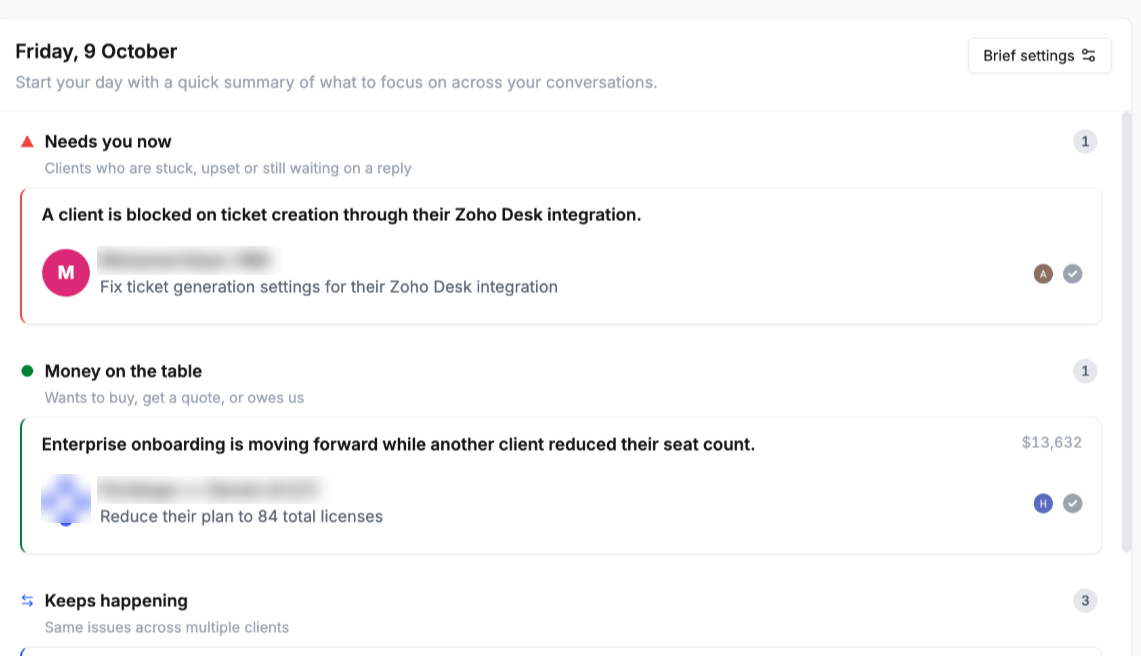
Needs You Now: Clients who are stuck or still waiting on a reply.
Money on the Table: Clients who want to buy, need a quote, or owe you money.
Keeps Happening: The same issues recurring across multiple clients.
To set it up: Open your dashboard, click Enable Daily Brief, and choose when you’d like to receive the updates.
👥 Mention Everyone in a Group with @all
You can now use @all to notify everyone in a group at once. It’s an easier way to bring the whole group’s attention to important updates without tagging members individually.
🔧 API Update: Clear Fields with null or ""
You can now clear supported fields by sending null or "" in your API request. If you leave a field out, its existing value stays unchanged.
Fields you can now clear:
Labels: Clear labels using
PATCH /chats/labels,/contacts/labels,/chats/{chat_id},/phones/update, and/tickets/{ticket_id}.Assignee: Unassign a chat using
assigned_toor a ticket usingassignee.Chat access: Set
access: nullwithreplace: trueto remove all member overrides.Reactions: Set
reaction: nullor""to remove your reaction.Property section: Set
section: nullto remove a property from its section.Tasks and tickets:
""now works the same asnullforassignee,due date,notes,reminder,status, andpriority.
For the full list of supported fields and how each one behaves, see the Periskope API documentation.
We hope these updates help you stay on top of conversations and get more done with Periskope. See you next week. ✨